.png) Fecha de publicación: 10/11/2014
Fecha de publicación: 10/11/2014
En este artículo vamos a ver como crear banners de una manera muy sencilla. Sólo necesitaremos un fichero que llamaremos jbanner.js y un fichero png donde introduciremos todas las imágenes que intervendrán en la animación.
Explicaré el funcionamiento con un ejemplo. Pues venga, empecemos:
1) Creación del fichero HTML
Lo primero de todo será crear nuestro fichero HTML. Allí introduciremos la etiqueta canvas que es el escenario donde se producirá la animación. Es importante que en dicha etiqueta introduzcamos los valores de alto y de ancho que tendrá nuestro banner.
index.html
<!DOCTYPE html>
<html lang ="es">
<head>
<meta charset="utf-8">
<script type="text/javascript" src="jquery-1.7.1.min.js"></script>
<script type="text/javascript" src="jbanner.js"></script>
<style type="text/css">
body{
background-color:black;
color:white;
}
#idbanner{
display:block;
width:300px;
height:600px;
margin:0 auto;
}
</style>
<title>Prueba de Banner con Canvas</title>
</head>
<body>
<a id="idbanner" href="#" title="El link del banner">
<canvas id="canvas" width="300" height="600">
</canvas>
</a>
</body>
</html>
Como os habréis dado cuenta también requeriremos de la biblioteca Jquery. Yo la utilizo para los eventos de inicialización ($(document).ready) y carga completa de la página ($(window).load) en el fichero jbanner, pero perfectamente las podéis sustituir por sus homólogos en Javascript y así ahorraros la carga de esta biblioteca.
2) Imágenes de la animación
El siguiente paso será crear el fichero que contendrá todas las imágenes de la animación. Para nuestro ejemplo vamos a hacer un banner de 300x600 píxeles y lo primero que necesitaremos será el fondo de la animación.
El fondo tiene que tener el mismo tamaño que el del banner (300x600) y debe estar esquinado a la izquierda tal como lo podemos ver en la Figura 1.
Figura 1
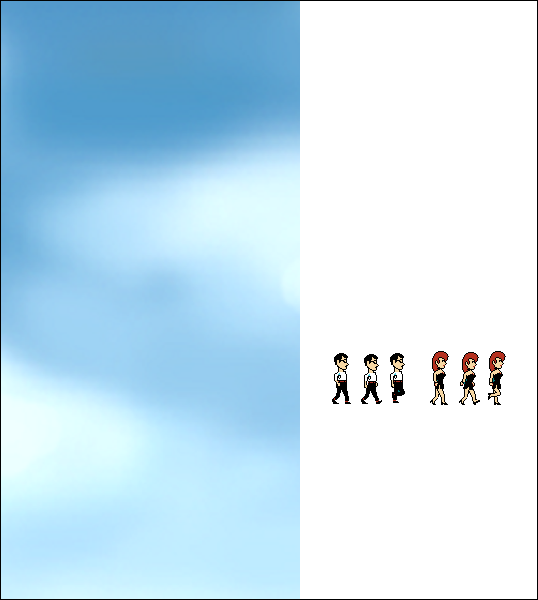
Las siguientes imágenes que insertaremos corresponderán a los sprites que realizarán la animación. En nuestro ejemplo serán el de un chico y una chica que caminarán sobre nuestro lienzo.
3) Parámetros de la animación
Bien, vamos a la carnaza. En el fichero jbanner.js será donde introduzcamos los parámetros necesarios para producir la animación del banner.
jbanner.js
var canvas, ctx, imgfondo;
var obj = [];
function parametros() {
var n = 0;
//Parámetros de la animación
rutafondo = 'fondo.png';
//animacion(x1,y1,x2,y2,velocidad,tiempo_inicio,tiempo_final)
n = obj.length;
obj[n] = new animacion(0, 100, 300, 100, 1, 0, 300);
obj[n].anyadir_sprite(331, 352, 23, 53);
obj[n].anyadir_sprite(360, 352, 23, 53);
obj[n].anyadir_sprite(389, 352, 23, 53);
obj[n].velocidad_cambio = 10;
obj[n].infinito = true;
//Fin de Parámetros
}
$(document).ready(inicializarEventos);
$(window).load(function() {
dibujaranimacion();
});
function dibujaranimacion() {
var chi = false;
for (var j = 0; j < obj.length; j++) {
if (obj[j].infinito) {
chi = true;
break;
}
if (obj[j].acabado != 1) {
chi = true;
break;
}
}
if (chi) {
requestAnimationFrame(dibujaranimacion);
fondo();
for (var i = 0; i < obj.length; i++) {
obj[i].animar();
}
}
}
function fondo() {
ctx.clearRect(0, 0, canvas.width, canvas.height);
ctx.drawImage(imgfondo, 0, 0, canvas.width, canvas.height, 0, 0, canvas.width, canvas.height);
}
function inicializarEventos() {
parametros();
canvas = document.getElementById('canvas');
ctx = canvas.getContext('2d');
ctx.imageSmoothingEnabled = false;
var gradienteLineal = ctx.createLinearGradient(0, 0, 430, 100);
gradienteLineal.addColorStop(0, '#2787B7');
gradienteLineal.addColorStop(0.5, '#5ABFF5');
gradienteLineal.addColorStop(1, '#268BC1');
ctx.fillStyle = gradienteLineal;
ctx.fillRect(0, 0, canvas.width, canvas.height);
imgfondo = new Image();
imgfondo.src = rutafondo;
}
function animacion_texto(texto, x1, y1, x2, y2, font, color_texto, velocidad, tiempo_inicio, tiempo_final) {
this.tiempo = 0;
this.acabado = 0;
this.infinito = false;
this.x1 = x1;
this.y1 = y1;
this.x2 = x2;
this.y2 = y2;
this.texto = texto;
this.font = font;
this.color_texto = color_texto;
this.velocidad = velocidad;
this.tiempo_inicio = tiempo_inicio;
this.tiempo_final = tiempo_final;
this.varx = x1;
this.vary = y1;
this.conservarimg = true;
this.sombra_espesor = 0;
this.sombra_color = 'rgba(0, 0, 0, 1)';
this.maximotexto = 0;
this.fadeinicio = false;
this.fadefinal = false;
if(this.x2 == this.x1) {
this.pendiente = 0;
} else {
this.pendiente = (this.y2 - this.y1) / (this.x2 - this.x1);
}
this.direccion = calcular_direccion(this.x1, this.y1, this.x2, this.y2);
this.animar = function animar() {
this.dibujar_fondo();
this.tiempo++;
if (this.tiempo > this.tiempo_final) {
if (this.infinito) {
this.resetear();
} else {
this.acabado = 1;
}
}
}
this.resetear = function resetear() {
this.tiempo = 0;
this.acabado = 0;
this.varx = this.x1;
this.vary = this.y1;
}
this.dibujar_fondo = function dibujar_fondo() {
var chi = false;
if (this.tiempo >= this.tiempo_inicio && this.tiempo <= this.tiempo_final) {
if (this.direccion == 3) {
if ((this.varx + this.velocidad) <= this.x2) {
this.varx += this.velocidad;
this.vary = this.pendiente * (this.varx - this.x1) + this.y1;
}
} else if (this.direccion == 4) {
if ((this.varx - this.velocidad) >= this.x2) {
this.varx -= this.velocidad;
this.vary = this.pendiente * (this.varx - this.x1) + this.y1;
}
} else if (this.direccion == 1) {
if ((this.vary + this.velocidad) <= this.y2) {
this.vary += this.velocidad;
}
} else if (this.direccion == 2) {
if ((this.vary - this.velocidad) >= this.y2) {
this.vary -= this.velocidad;
}
}
chi = true;
} else {
if (this.conservarimg && this.tiempo > this.tiempo_final) {
chi = true;
}
}
if (chi) {
ctx.font = this.font;
ctx.fillStyle = this.color_texto;
if (this.fadeinicio) {
if (this.tiempo >= this.tiempo_inicio && this.tiempo <= this.tiempo_inicio + 60) {
ctx.globalAlpha = (this.tiempo - this.tiempo_inicio) /60;
}
}
if (this.fadefinal) {
if (this.tiempo >= this.tiempo_final - 80) {
ctx.globalAlpha = (this.tiempo_final - this.tiempo) / 60;
}
}
if (this.sombra_espesor > 0) {
ctx.shadowBlur = this.sombra_espesor;
ctx.shadowColor = this.sombra_color;
} else {
ctx.shadowBlur = 0;
}
if (this.maximotexto != 0) {
ctx.fillText(this.texto,this.varx, this.vary, this.maximotexto);
} else {
ctx.fillText(this.texto, this.varx, this.vary);
}
ctx.globalAlpha = 1;
}
}
}
function animacion(x1, y1, x2, y2, velocidad, tiempo_inicio, tiempo_final) {
this.tiempo = 0;
this.acabado = 0;
this.x1 = x1;
this.y1 = y1;
this.x2 = x2;
this.y2 = y2;
this.velocidad = velocidad;
this.tiempo_inicio = tiempo_inicio;
this.tiempo_final = tiempo_final;
this.varx = x1;
this.vary = y1;
this.conservarimg = true;
this.objsprites = [];
this.nimagenalterna = 0;
this.nimagenalterna2 = 0;
this.velocidad_cambio = 10;
this.infinito = false;
this.fadeinicio = false;
this.fadefinal = false;
if (this.x2 == this.x1) {
this.pendiente = 0;
} else {
this.pendiente = (this.y2 - this.y1) / (this.x2 - this.x1);
}
this.direccion = calcular_direccion(this.x1, this.y1, this.x2, this.y2);
this.animar = function animar() {
this.dibujar_fondo();
this.tiempo++;
if (this.tiempo > this.tiempo_final) {
if (this.infinito) {
this.resetear();
} else {
this.acabado = 1;
}
}
}
this.anyadir_sprite = function anyadir_sprite(x1, y1, ancho, alto) {
var n = this.objsprites.length;
this.objsprites[n] = x1 + '|' + y1 + '|' + ancho + '|' + alto;
}
this.resetear = function resetear() {
this.tiempo = 0;
this.acabado = 0;
this.varx = this.x1;
this.vary = this.y1;
}
this.dibujar_fondo = function dibujar_fondo() {
var chi = false;
if (this.tiempo >= this.tiempo_inicio && this.tiempo <= this.tiempo_final) {
if (this.direccion == 3) {
if ((this.varx + this.velocidad) <= this.x2) {
this.varx += this.velocidad;
this.vary = this.pendiente * (this.varx - this.x1) + this.y1;
}
} else if (this.direccion == 4) {
if ((this.varx - this.velocidad) >= this.x2) {
this.varx -= this.velocidad;
this.vary = this.pendiente * (this.varx - this.x1) + this.y1;
}
} else if (this.direccion == 1) {
if ((this.vary + this.velocidad) <= this.y2) {
this.vary += this.velocidad;
}
} else if (this.direccion == 2) {
if ((this.vary - this.velocidad) >= this.y2) {
this.vary -= this.velocidad;
}
}
chi = true;
} else {
if (this.conservarimg && this.tiempo > this.tiempo_final) {
chi = true;
}
}
if (chi) {
if (this.objsprites.length > 0) {
var aux = this.objsprites[this.nimagenalterna2].split('|');
if (this.acabado == 0) {
var total = this.objsprites.length * this.velocidad_cambio;
if ((this.nimagenalterna + 1) % this.velocidad_cambio == 0) {
this.nimagenalterna2++;
this.nimagenalterna++;
if (this.nimagenalterna >= total) {
this.nimagenalterna = 0;
this.nimagenalterna2 = 0;
}
} else {
this.nimagenalterna++;
}
}
if (this.fadeinicio) {
if (this.tiempo >= this.tiempo_inicio && this.tiempo <= this.tiempo_inicio + 60) {
ctx.globalAlpha = (this.tiempo - this.tiempo_inicio) / 60;
}
}
if (this.fadefinal) {
if (this.tiempo >= this.tiempo_final - 80) {
ctx.globalAlpha = (this.tiempo_final - this.tiempo) / 60;
}
}
ctx.shadowBlur = 0;
ctx.drawImage(imgfondo, aux[0], aux[1], aux[2], aux[3], this.varx, this.vary, aux[2], aux[3]);
ctx.globalAlpha = 1;
}
}
}
}
function calcular_direccion(x1, y1, x2, y2) {
var direccion = 0;
if ((x1 == x2) && (y1 == y2)) {
direccion = 0; //Estático
} else if (x1 == x2) {
if (y1 < y2) {
direccion = 1; //Arriba -> Abajo
} else if (y1 > y2) {
direccion = 2; //Abajo -> Arriba
}
} else if (y1 == y2) {
if (x1 < x2) {
direccion = 3; //Izquierda -> Derecha
} else if (x1 > x2) {
direccion = 4; //Derecha -> Izquierda
}
} else {
if (x1 < x2) {
direccion = 3; //Izquierda -> Derecha
} else {
direccion = 4; //Derecha -> Izquierda
}
}
return direccion;
}
Será en la función parámetros donde introduzcamos el código que realizará toda la "magia".
rutafondo: aquí pondremos la ruta de nuestra imagen. En nuestro ejemplo será fondo.png
3.1) Objeto Animación
animacion: aquí es donde crearemos la animación de un objeto en concreto. Se pueden crear tantos objetos como necesitemos ya que utilizamos el sistema basado en POO.
Su sintaxis es:
animacion(x1, y1, x2, y2, velocidad, tiempo_inicio, tiempo_final)
- x1, x2, y1, y2: Son las coordenadas desde donde se moverá nuestro objeto de un punto inicial (x1,y1) a un punto final (x2,y2)
- velocidad: la velocidad de movimiento de nuestro objeto. Su valor mínimo es 1.
- tiempo_inicio: El tiempo en microsegundos en el cual deseemos que empiece nuestra animación. Su valor mínimo es 0.
- tiempo_final: El tiempo en microsegundos en que la animación acabará. Su valor debe ser siempre superior a tiempo_inicio.
anyadir_sprite: Será la imagen que animaremos sobre el lienzo. Sus parámetros son:
- x1: La coordenada x donde se halla el sprite.
- y1: la coordenada y donde se halla el sprite.
- ancho: el ancho en píxeles que ocupa el sprite.
- alto: el alto en píxeles que ocupa el sprite.
Bien, con estos parámetros vamos a ver un ejemplo en que movemos a un personaje desde un punto inicial a un punto final.
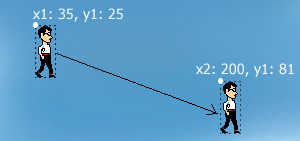
Dentro de la función parametros escribiremos este código:
//Parámetros de la animación
rutafondo='fondo.png';
//animacion(x1,y1,x2,y2,velocidad,tiempo_inicio,tiempo_final)
n=obj.length;
obj[n]=new animacion(35,25,200,81,2,0,300);
obj[n].anyadir_sprite(331,352,23,53);
obj[n].conservarimg=true;
//Fin de Parámetros
3.1.1) Técnica de Sprites
Como hemos comentado al objeto animación le podemos relacionar infinitos sprites y en nuestro ejemplo vamos a simular al chico caminando. Para ello tendremos que relacionar los 3 sprites que simulan el movimiento.
Para realizar esto incluiremos en el objeto 3 veces la función anyadir_sprite incluyendo las coordenadas del chico.
n = obj.length;
obj[n] = new animacion(0, 100, 300, 100, 1, 0, 300);
obj[n].anyadir_sprite(331, 352, 23, 53);
obj[n].anyadir_sprite(360, 352, 23, 53);
obj[n].anyadir_sprite(389, 352, 23, 53);
obj[n].velocidad_cambio = 10;
obj[n].infinito = true;
3.1.2) Resto de propiedades del objeto animación
Como habréis visto en los ejemplos hemos introducido una serie de propiedades que afectan al comportamiento de la animación.
infinito: Le indicamos al objeto que cuando termine su animación vuelva a reproducirse desde el principio. Valores: true o false.
conservar_img: Le indicamos que cuando finalice la animación de un objeto se conserve la última imagen. Valores: true o false.
velocidad_cambio: Esta propiedad afecta a la transición de sprites en el caso que en un objeto animación introduzcamos diversos sprites. Cuanto mayor sea el número el cambio de un sprite por otro será más lento siendo 1 el valor mínimo.
fadeinicio: si queremos que nuestro objeto animado empiece con un fundido inicial. Valores: true o false.
fadefinal: si queremos que nuestro objeto finalice su animación con un fundido. Valores: true o false.
3.2) Objeto animación de texto
Para introducir un texto en nuestra animación lo haremos mediante el objeto animacion_texto.
animacion_texto(texto, x1, y1, x2, y2, font, color_texto, velocidad, tiempo_inicio, tiempo_final)
- texto: El texto que deseemos que aparezca.
- x1, x2, y1, y2: Son las coordenadas desde donde se moverá nuestro objeto de un punto inicial (x1,y1) a un punto final (x2,y2)
- font: La fuente del texto. El formato lo escribiremos de este modo: "font-style font-weight font-size font-family".
Ejemplos: "italic bold 12px Arial ","16px Tahoma", "Italic 13px Arial", etc…
Puedes ver mejor el formato en este link: http://www.w3schools.com/tags/canvas_font.asp - color_texto: el color del texto
- velocidad: la velocidad de movimiento de nuestro objeto. Su valor mínimo es 1.
El resto de propiedades de este objeto son:
infinito: Le indicamos al objeto que cuando termine su animación vuelva a reproducirse desde el principio. Valores: true o false.
conservar_img: Le indicamos que cuando finalice la animación de un objeto se conserve el último texto.Valores: true o false.
sombra_espesor: Le indicamos el grado de sombra que tendrá nuestro texto. Valores desde 0 (sin sombra) hasta 10.
sombra_color: El color de la sombra de texto si le introducimos la sombra_espesor
fadeinicio: si queremos que nuestro texto empiece con un fundido inicial. Valores: true o false.
fadefinal: si queremos que nuestro texto finalice su animación con un fundido. Valores: true o false.
DESCARGAR EJEMPLO BANNER ANIMADO.zip(1.454 descargas)